

Hey there,
Last week I sat in a parked car outside a customer’s plant with the engine off and my phone in my hand.
The meeting had gone well. I had promised three things: a technical data sheet, a revised quote, and a follow-up call to the plant head on Thursday.
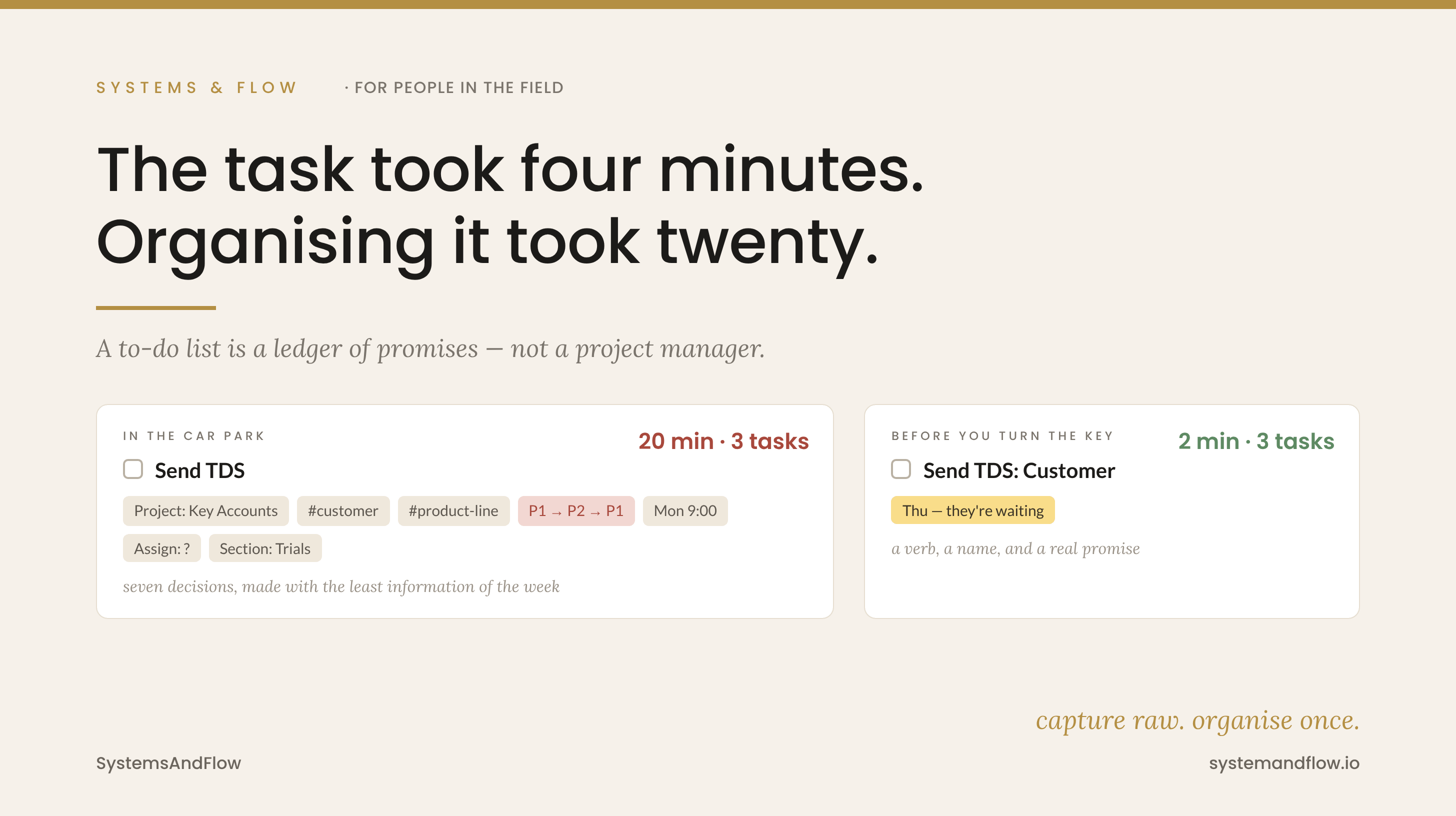
So I opened my task app. Created the first task. Picked a project. Added a label for the customer. Added a label for the product line. Set priority. Set a date. Thought about whether it should be assigned to one of my engineers. Changed the priority.
Then I did it twice more.
Sending the data sheet took four minutes once I got to it. Filing the three tasks took close to twenty. And my next appointment was forty minutes’ drive away.
That’s when the question finally landed: what is the job of a to-do list? Because whatever I was doing in that car park, it wasn’t that.
We quietly turned a list into a project management system
Modern task managers can do almost anything. Projects, sections, labels, priorities, assignees, due dates, start dates, durations, filters, views.
So we use all of it. A simple list slowly becomes a hybrid project management system, one we built for ourselves and now have to keep running ourselves.
And a system like that has a cost nobody puts on the pricing page: upkeep. Every label needs to stay consistent. Every project needs to stay current. Every priority needs re-checking, because yesterday’s P1 is today’s P3.
For someone at a desk all day, that upkeep might be ten minutes. For someone in field sales, it’s ten minutes we don’t have, taken out of the only screen time we get.
So the system goes stale. We stop trusting it. And then we spend a Sunday “rebuilding” it, which feels productive and moves no customer forward.
This is not case with my current task app, Superlist but I have the same hybrid project management with Todoist, TickTick and in things 3 as well.
The part I had wrong: every field is a decision
Here’s what I worked out after 4 years and 60+ apps (not my professional work experience of 20 year’s but the productive field professional one)
Every field you fill in when you capture a task is a small decision. Which project? Which label? How urgent? Whose job?
And you make those decisions at the worst possible moment: in a car park, between meetings, with the least information you’ll have all week. You don’t yet know what Thursday looks like. You don’t know which of the three promises matters most. You’re guessing, then building a structure on top of the guesses.
Capture should be the cheapest step in your system. Most of us made it the most expensive.
There’s a second problem in field sales: copies
There’s also a problem specific to people like us.
Our work already lives somewhere. The company CRM/Portal. Our weekly visit report. The WhatsApp thread with the customer & business partner . The email with the quote.
Then we build a second version of the same picture inside our task app, with the customer as a project, the product as a label, the opportunity stage as a section.
Now there are two records of the same account. They never match. And keeping them in sync becomes another task, one that never shows up on any list.
Your to-do list doesn’t need to know the whole story of an account. The CRM already has that. The list needs to know one thing: what you promised, and what you have to do next.
So what is the job of a to-do list?
My answer now is narrow on purpose:
A to-do list is a ledger of promises and next actions. Nothing more.
Not a map of your work. Not a record of your accounts. Not a report for your manager. It answers one question each morning: what have I said I’ll do, and what’s next?
Everything else is a different job, and probably belongs to a different tool.
The simple way out, for a field week
This is what I run now. It fits in the gaps of a field day.
1. Capture with two things only: a verb and a name.
“Send TDS: Acme Industries.” “Call plant head: Acme Industries.” “Revise quote: Acme Industries.”
The customer name in the title is your label. Search finds it in a second. You don’t need a tag system to remember who you met this morning.
2. Add a date only when someone else is waiting on it.
If I told the customer “Thursday”, it gets Thursday. If nobody is waiting, it gets no date. Most fake deadlines are dates we gave ourselves just to fill a field.
3. Drop priority altogether.
In field sales, the date is the priority. A promise to a customer by Thursday outranks a “P1” I set myself on Monday morning.
4. Assign only when you actually hand something off.
I lead a team, so assigning is real work for me, but only at the moment I hand something to an engineer. Not as a field I fill in on every task, just in case.
5. Three lists. That’s the whole structure.
Inbox: everything from the road, raw
This Week: what I’ve committed to
Waiting On: what I’ve handed off or am waiting on a customer for
6. Capture before you turn the key.
After every visit, before the car moves: two minutes, voice or thumbs, every promise out of my head. I use Superlist voice capture for this. Don’t sort anything. Just get it down.
I also use Wispr Flow on the go to capture the meeting notes - in my own words and understanding (that’s an experiment for the another blog post)
7. Organise once, not forty times.
The sorting happens once a week, at a fixed time, at a desk. That’s where dates get checked, waiting items get chased, and anything that’s really a project goes to wherever my projects live. One sitting replaces forty little filing decisions on the road.
Where I’d push back on my own advice
This isn’t “structure is bad.” That’s the lazy version, and it’s wrong.
Structure is worth its upkeep when you actually use it to decide something. If you filter by a label every week, keep it. If you haven’t filtered by a label in a month, it’s decoration, and you’re paying upkeep on decoration.
A quick test for your own app this week: open your labels and delete every one you haven’t filtered by in 30 days. Then do the same for projects that are really just a single task with a fancy name.
What’s left is the structure you actually use. Everything else was you organising the system instead of working the territory.
Where I’ve landed
The job of a to-do list is to make sure you keep your promises and know your next move. A system that takes twenty minutes to file three promises is failing at that job, however good it looks.
In field sales, the work happens at the customer’s plant, not in the app. The app’s only job is to make sure you walk into the next meeting having done what you said you’d do at the last one.
Capture raw. Date only real promises. Organise once a week.
The less your list knows, the more you’ll trust it.
If you work in the field: what’s the one field you fill in on every task and never use? Hit reply. I’m collecting these, and I suspect we all have the same three.
Talk soon,
Thank you,
Astu — SystemsAndFlow
Kaushik Hasmukhrai Trivedi
Affiliate note: You will find 2 affiliate link; Superlist and Wispr Flow. I am using both for my personal use and paid from my pocket. If you use my link, I will earn a commission without any additional cost to you.
If someone forwarded this to you, welcome. You can subscribe here.
Find me on X · Medium · Buy me a coffee