

Hey friends,
I want to tell you about a switch I made two weeks ago, because it’s the kind of thing this newsletter exists for — not hype, just one person’s working system changing in a way that might matter to yours.
For two years my stack had three legs. Obsidian for notes. Coda for projects. Superlist for tasks. Clean on paper. In practice, I spent more time shuffling information between those three apps than actually using any of them. A note referenced a project that spawned a task, and keeping the three in sync was an unpaid part-time job I never applied for.
I’ve barely opened any of them since I started using Workflowy.
Before I go further — two things you deserve up front. I’ve applied to Workflowy’s affiliate program, so I have a reason to want you to like it. And I’m only two weeks in, which is long enough to feel a switch but not to know if it survives a hard quarter. Read accordingly.
Here’s what actually changed — and it isn’t a feature.
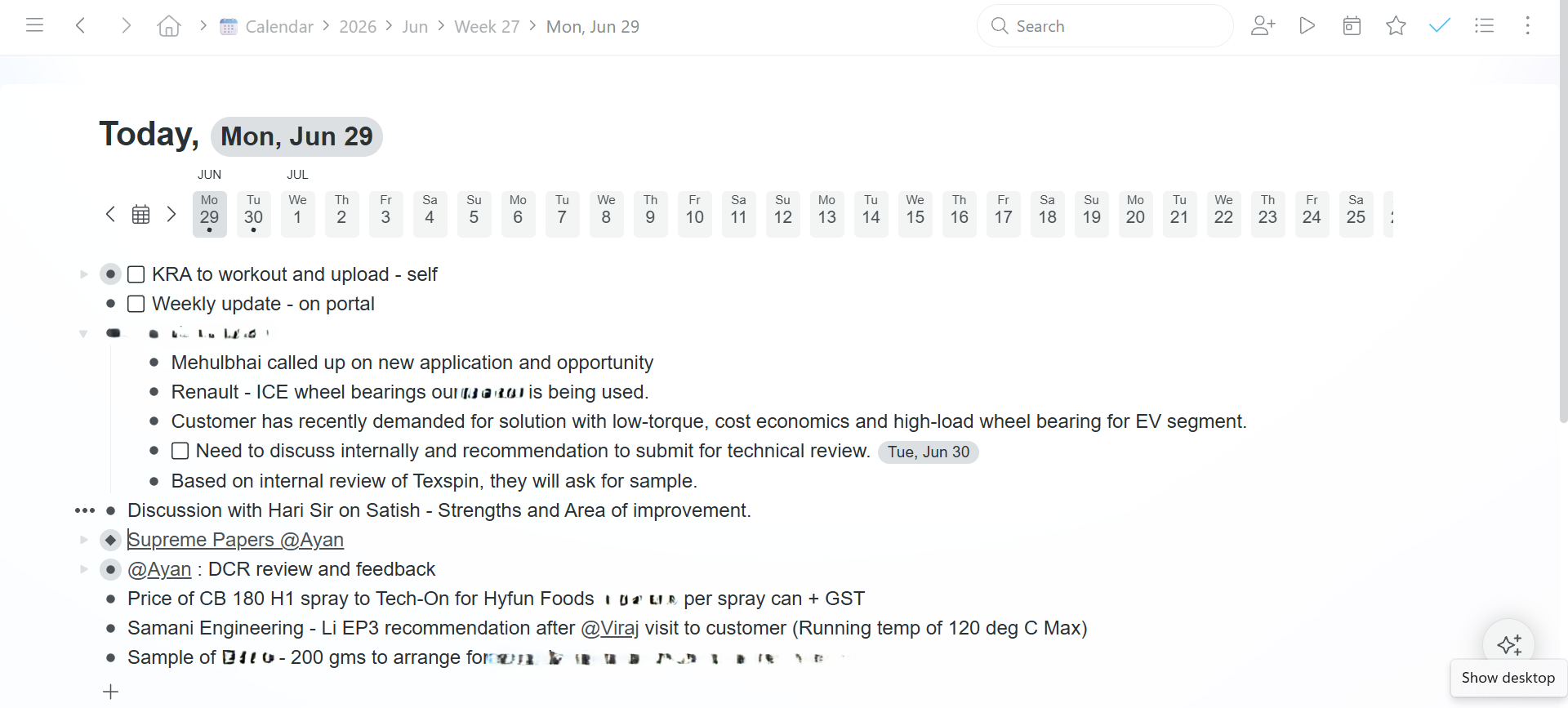
Every app in my old stack could hold my notes, projects, and tasks. None could connect them without friction. I’d tuned Obsidian hard — daily notes, calendar plugin, a Kanban view, a wall of plugins — and the more I optimized, the clearer it got that I was building scaffolding to compensate for the fact that my project notes lived where my tasks didn’t. I even ran to Capacities for a week to fix it. Same wall, one app over.
Workflowy is the least impressive app of the bunch. It’s an outliner. Bullets inside bullets. That’s the pitch. But because everything is a bullet — note, project, goal, task, journal entry — connecting them isn’t something you configure. It’s just how the thing works. A task lives under a project, mirrors into today’s note, and carries a date, all without leaving the outline.
The friction I was building elaborate systems to manage? It’s just gone. That’s the whole story.
What’s carrying the weight day to day:
One daily note holds everything — work logs, journaling, idea capture, tasks, even my atomic essay drafts. A side-panel lets me review yesterday while writing today. Any list flips into a Kanban board and back with no migration. Mirroring keeps one task as a single source of truth across multiple places. And it’s genuinely good on Windows, Android, and iOS — my old stack never was, equally, everywhere.
Now the part most newsletters skip: don’t follow me if —
You think visually. Workflowy is text and bullets. No canvas, no graph, no spatial maps. If that’s how your brain works, it offers you nothing.
Your projects need real database power. Multiple linked tables and formulas? Workflowy will feel like a toy next to Coda or Notion. I could downgrade Coda only because my projects aren’t database-heavy. Yours might be.
Your current system already works. The cost of switching a working setup almost always beats the gain. I switched because mine wasn’t working — not because Workflowy beats everything.
And one honest flag: I’ve been living in the beta, so a few things I love may shift before they hit the stable app. Treat this as where Workflowy is heading, not a frozen spec.
The money part: Free plan is usable but capped at roughly 100 new bullets a month. Pro is $6.99/month (paid annually), removes the cap, and adds backlinks and advanced search. No per-user fees, no storage limits. One of the cheaper tools I pay for.
The verdict is simple. Workflowy didn’t win on features. It won by deleting the friction between the three apps I was already paying for. If a tangle of apps is the thing draining you, it’s worth a real trial. If your system already hums, keep it.
That’s where I am after two weeks. I’ll report back when I’ve stress-tested it past the honeymoon.
One question for you, and hit reply — I read everything: what’s the app in your stack you keep meaning to consolidate but haven’t? I’m curious whether I’m an outlier or whether everyone’s quietly drowning in the same three-app problem.
Talk soon, Kaushik
P.S. — If you do try it and it sticks, the trial will tell you within a day whether the bullet format clicks for you. It’s polarizing. You’ll know fast.
Disclosure: I’ve applied to Workflowy’s affiliate program. I pay for it with my own money and switched before applying.
I've been using Workflowy for 152 weeks now and I have to say: I absolutely love it! I use it for everything: tasks, projects, notes, calendar, habits...... It just works! Workflowy is the kind of tool that shows that "simplicity" isn't a downgrade, but an advantage. Thanks for sharing your experience. New subscriber here!