


Note-taking is one of the key area of interest to me and am always looking eagerly at the new cool app in the ‘connected notes’ universe.
Reflect is the one, I am exploring now.
What is Reflect?
Reflect is a connected notes app to capture your idea, book notes or meeting notes at a lightening speed, with end-to-end encryption, an amazing map view, and extremely powerful backlinking.
You can use Reflect notes for your daily journaling, meeting notes or book notes (Kindle integration) with the Web app or iOS (beta) app and it offers excellent experience of outliner with the support of markdown.
Before we jump into the app review; here’s a list of a must for me from any note-taking app.
Speed
UI/UX
Backlinks — connected notes
Calendar integration
Web or Windows app
Let us look at the Reflect now;
Speed
Reflect is one of the very few apps which offers a superfast — lightening speed experience throughout the app.
Quick capture with Reflect is super easy and intuitive with the least amount of friction.
You can use an iOS app (beta) which offers a better experience than a bigger screen.
2. Ease of use, UI/UX
A super smooth, simple and very intuitive experience
Makes onboarding very easy
Almost zero learning curve which is very rare nowadays

There are mainly 3 sections:
Editing area
This is the area where your thoughts meet your words and you can go on focus mode by Ctrl+Shift+F (Windows) and the sidebars will go out of the way.
Reflect offers infinite days and only one view as a timeline which is best suited for a person like me, who likes to make some notes in past (last week) & future (coming week)
Universal slash command offers standard options of text formatting and additional template options directly from the slash command.

Left sidebar
This is where your notes are organized, yes in a way of daily notes, all notes and Map. You can pinned your notes for easy access and will be available readily in left sidebar.
Right sidebar
This is where you can pin your note, share your note (one-click publishing), you can view history of that note and calendar.
Upcoming meetings can be visible from here and you can also see all your outgoing links and tags from this side.
Backlinks
Reflect is truly a backlink superstar, you can simple use [[ and backlink.
Happen to use many note-taking apps and by far the backlinking in Reflect feels like a joy to use.
Not only backlinks but the way Reflect tags work is also super useful, for example, person, company (for me; type of industry, person, location)
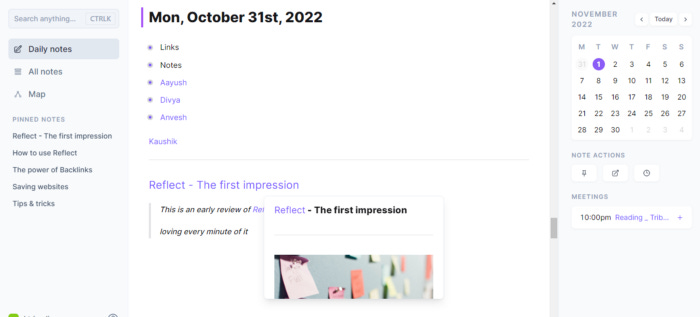
One of the best things about Reflect is the clear understanding of the use of Backlink & Tags and the ease of use.
Here’s the link from the reflect academy: https://reflect.academy/using-backlinks-and-tags
Calendar Integration
Reflect is basically your infinite diary, having endless pages and it is very much essential to have your meeting references, notes at your fingertips.
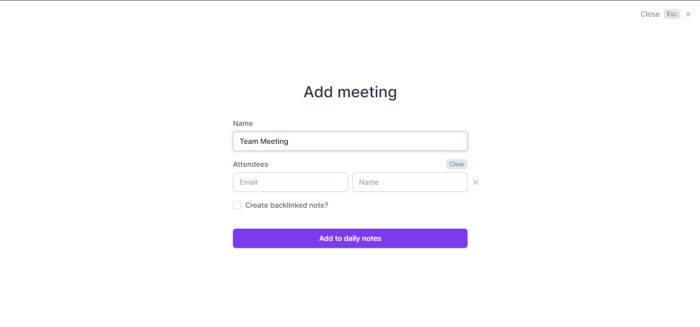
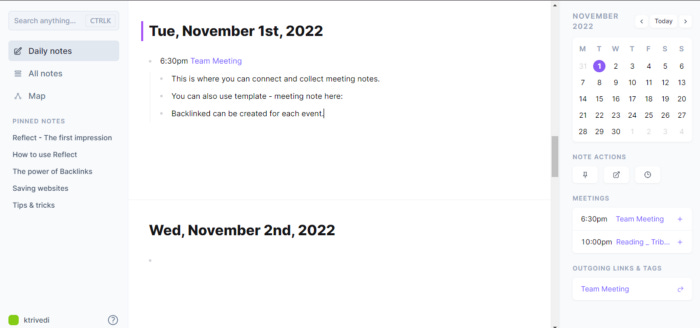
Reflect offers integration of your Google account and you can add meeting and also have backlinked notes for that meeting which comes handy whether that’s a one time or recurring meeting.
I like the idea to have a simple meeting note template for all the meetings.
For example:

For me, iOS exclusive apps are good to use but that offers a limited experience to me and I am exploring apps that are either available on the Web or have Windows app.
Reflect offers a Web app, macOS & iOS app (beta), which works fine for me.
Apart from this;
Map View
Map view offers an amazing view of your notes in a truly connected way and the more linked notes you create, the more you enjoy the Map view,
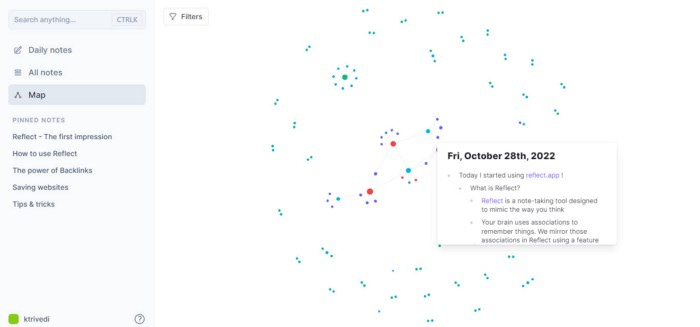
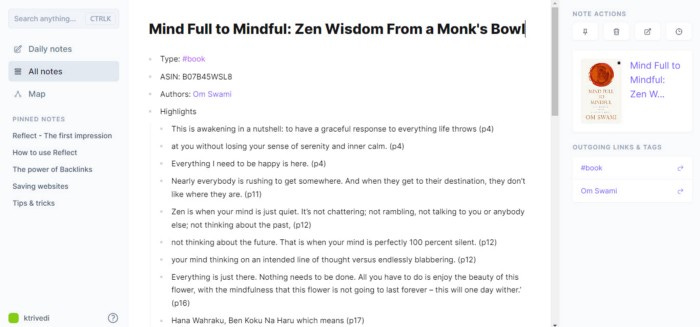
Kindle sync
At a superfast speed, all your kindle highlights are available to you. You will be amazed by the speed and sync ability of Reflect.
All your kindle highlights will be tagged as #book and #author for easy access.
Chrome extension for easy capturing
Reflect also offers a chrome extension for your quick capture, you can select the text that you want to capture and hit the extension and the link will be saved in your Reflect notes.
Reflect notes — roadmap is promising detailed task management, my kind of thing to wait.
On the pricing front;
Reflect offers 2 week trial period and after that 10$ per month (billed annually) plan.
As mentioned earlier, Reflect has MacOS, Web & iOS (beta) app
In a nutshell,
I am super happy with the speed, experience, end-to-end encryption, ease of backlinking, tags, kindle sync, calendar integration, and overall app design and experience, will be looking forward to the next big ‘Task Management Update’
Give it a try, yourself and enjoy the truly connected notes app, Reflect.
Thanks for reading.
Keep reading, and keep sharing.
Astu.